
Building your campaign page is a critical part of the process—and it's also pretty fun. Our Story Editor is designed to be user-friendly and should allow you to upload all the imagery, video, and copy you need to explain your company and offering.
Before writing, peruse some company pages on StartEngine to get a feel for what types of content you enjoy seeing.
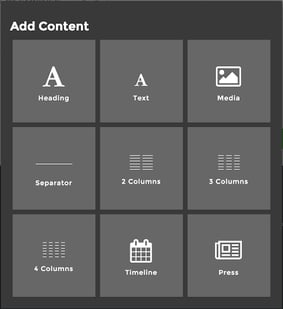
StartEngine pages are built on 1-4 column grids. As you plan out your page, consider which imagery will complement which text so you can anticipate how content will look on the page.
Otherwise, it's pretty simple. Click on the blue "+" icon and you will see a set of choices to add your content:
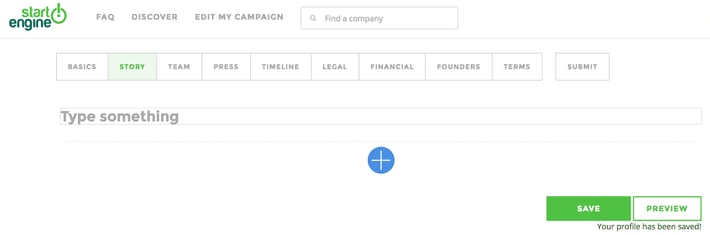
Then simply, click on the rectangular box and start typing.
To edit, highlight the text and a menu bar with editing options is display. You can:
- Select the text size by clicking the heading icon
- Align the text left, center or right justified
- Select italics
- Choose the color for the text
- Undo or Redo the last edit
What if my campaign does not have a video?
Although StartEngine does not requires that companies on our site have a video, research shows that there is a higher conversion rate and success rate for crowdfunding campaigns that do use a video. The video does not have to be a complicated or costly production, it is simply a great opportunity for you to interact with your investors by showcasing your product or service.
Attachments:
- 🔗 unnamed-1.png (21.6 kB)
- 🔗 unnamed.png (36 kB)